Typography: Task 3

14/11/2023 - 13/12/2023 / Week 8  - Week 12

 Lim Yu Xuen / 0359676

Typography/ Bachelor of Design (Hons) in Creative Media / Taylor's University

Task 3: Type Design & Communication (Font Design)

୨୧ __________________________________________________________ ୨୧


TABLE OF CONTENTS

1. Lectures
2. Instructions 
3. Project 3 
     Process Work
         3.1 Research
         3.2 Deconstruction of letterforms
         3.3 Sketching of alphabets
         3.4 Digitalisation of letterforms
         3.5 Development of font in Fontlab
         3.6 Poster Design using developed font
         3.7 Final Submission Materials
4. Feedback 


୨୧ __________________________________________________________ ୨୧


 LECTURES 

14 November 2023

Lecture 8 (Recess Week)


21 November 2023

Lecture 9

Ms Hsin Yin and Mr Vinod gave us feedback and opinions on the design style that would be the best. We spent the day in class sketching and correcting our letters and symbols. Mr Vinod also taught us different methods to digitalise our typefaces. It was recommended to incorporate lines, shapes and strokes. We also learnt new tools such as the pathfinder and width tool.


28 November 2023

Lecture 10

Ms Hsin Yin and Mr Vinod looked through the drafts for our digitalised typeface. They gave us helpful feedback on how to make it better. After that, we receive individual feedback and started to make improvements on our letterforms. At the end of the class, My Vinod mention some information to take note before importing our letterforms into FontLab.


5 December 2023

Lecture 11

Ms Hsin Yin gave more feedback on a few minor mistakes made in my letterforms. She also gave us an extra week to further refine our letterforms on Illustrator before importing into FontLab. We used this time to fix the minor details on our letterforms.


12 December 2023

Lecture 12

Ms Hsin Yin and Mr Vinod instructed us to download FontLab 7 and import our fonts from Illustrator to FontLab. They proceeded to give us a short lecture on how to work with kerning in FontLab and gave us the time to kern our typefaces. Afterwards, we have to export our typeface from FontLab and create a poster with it.


୨୧ __________________________________________________________ ୨୧


 INSTRUCTIONS 

Task 3: Type Design & Communication (30%)

Design a limited number of western alphabets. To begin, we were required to choose an existing font that adheres to the direction that I would like to head in. Afterwards, we had to study the font carefully by analysing its anatomical parts.

Start with rough sketches, explore a variety of options and upon begin digitisation of the drawings- the softwares required for digitisation are Adobe Illustrator and later Fontlab. Artworks shall be printed out for critique sessions followed by refinements. If time permits we shall generate the font for actual use. 

You will endeavour to create a typeface that has the hallmarks of a good typeface; subtlety or character, presence, legibility, and readability. 

Below are the letters to design: 

  • a e t k g r I y m p n ! # , . 
Upon completion of the font, it is required to create a basic A4 size poster displaying my font (further instructions will be given in class). 

Submission:

Eportfolio:
  • All gathered information (failures, successes, epiphanies, sketches, visual research, printouts, websites, images, charts, etc). Must be documented logically and chronologically in the portfolio for the duration of the task in one post
  • All images / sketches / diagrams / scans must be captured / photographed / scanned well, with good even natural light, without shadows- use of tube / bulb / flash light is not allowed. All images / sketches / diagrams / scans but be labelled (fig 1 , 2 , etc.), described and dated. Final submission must be indicated clearly (distinguishable from process work) and uploaded as PDF ad JPEG & .TTF (True Type Font) or as instructed in class.
  • Tasks to be documented in a printed A4 enclosed in a Clear Sheet, logically and chronologically. The works must be labelled and dated- use pencil and write neatly.
Marking Criteria:
  • Evidence of in-depth research and visual analysis is visible
  • Multiple ideas have been explored with great care and deliberation
  • The design process showcases knowledge of typographic convention, methodology and production
  • The designs are extremely well crafted, consistent and technically sound
Learning Goals:
  • To develop student's ability to design a font with consistent characteristics premised on research and analysis
  • To develop student's ability to design a font with consistent characteristics premised on research and analysis
Timeframe:
  • Week 8 - Week 9 (Deadline: Week 10)


Read more about this module below

Document 2.1 Module Information Booklet (MIB) of Typography

୨୧ __________________________________________________________ ୨୧


 PROCESS WORK 

3.1 Research

Before getting started on drafting my desired letterforms, I made good use of my time to do some ample research on the anatomy of typefaces. I researched on different letterforms.


Anatomy of typefaces:

I looked through the internet for more details regarding the anatomy of typefaces. The anatomy of typography or type refers to the visual elements that come together to form the letterforms in a typeface. Each letterform comprises of various components like the spine, stem, and stroke.

When type designers are creating typefaces, they make sure to carefully craft these components which are essential in determining the overall look and readability of the typeface.
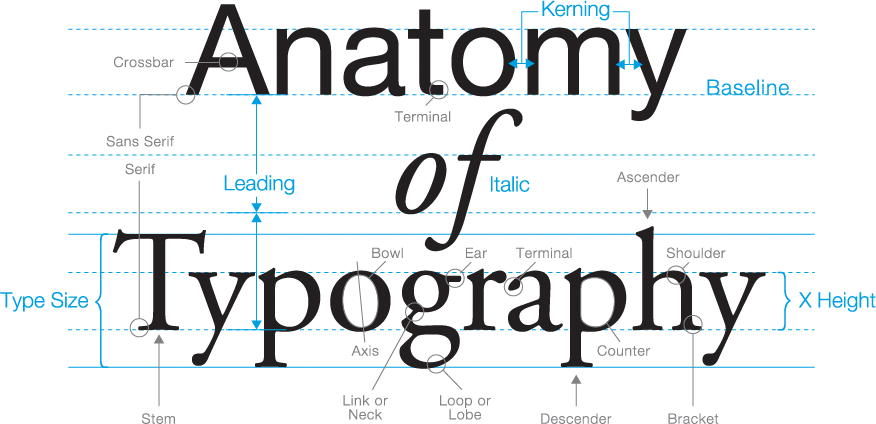

Typography: The Anatomy of a Letter - Osman Assem | Digital Art Monster

Figure 3.1.1 Anatomy of typeface, source , Week 7 (8/11/2023)


Type Anatomy A-Visual-Guide-to-the-Anatomy-of-Typography-Infographic

Figure 3.1.2 Visual guide to the anatomy of typography, source , Week 7 (8/11/2023)


3.2 Deconstruction of letterforms

Ms Hsin Yin tasked us to choose a serif and sans serif typeface to deconstruct and analyse the details. It is important to understand what are the changes made in these typefaces.

The font that I decided to deconstruct is:

Sans Serif - Futura Light

Serif - Futura Oblique


3.3 Sketching of alphabets

We were instructed to prepare 9 different sketches using 3 different types of pens. The pens that I have used are: Flat tip pen, round tip pen, and a calligraphy pen.


Top Row: Flat tip pen (Black)

Bottom Row: Calligraphy pen (Blue)

Figure 3.3.1 All my sketches in creating my font, Week 9 (21/11/2023)

Figure 3.3.2 Final chosen sketch to work with, Week 9 (21/11/2023)

After receiving feedback, the final chosen sketch was refined and ready to be digitalised.


3.5 Digitalising of words

We were required to use Adobe Illustrator to digitalise our words. I first chose a similar font for reference. After that, I turned the text into shapes by pressing on (Type > Create Outlines). Next, I used the Direct Selection Tool to drag the outlines into the shapes for my first draft's format.

First Draft

Figure 3.5.1 First Draft Idea, Week 10 (28/11/2023)


Figure 3.5.2 First Draft Letters, O D H N G, Week 10 (28/11/2023)

After receiving individual feedback from Ms Hsin Yin, she was worried that the other letters would be hard to design as it may look inconsistent. I was told to try drafting out the other required letters which is all in all O L E D S N C H T I G . , # !

Figure 3.5.3 First Draft Letters, C E L, Week 10 (28/11/2023)

I made a few changes while editing the other letters required. Halfway through designing the letters, I realised that this First Draft Idea was not consistent enough and I have decided to make huge changes to my letterform while keeping the original idea in mind. Some of the ideas I have kept are: Small hook at the edges, Change in Thicker Strokes, Shape inside rounded edges. My second draft was then created by making the letters thicker, and adjusting the sharpness of the hook.

Second Draft

Figure 3.5.4 Second Draft Letter, G, Week 10 (28/11/2023)

For this draft, I finalised the changes for the letter G. I was happy with the results and have edited the rest of the letters using the same concept and design.

Figure 3.5.5 Second Draft Letters, O D H N G, Week 10 (28/11/2023)

In the next class, I showed my second draft to Ms Hsin Yin. She recommended to continue with the design and concept. It was time to finish the remaining letters, which are: L E S H T I.,!#

Figure 3.5.6 Second Draft Letters, O L E D S N C H T I G .,!#


Changes done after feedback session

Letter H

I changed the thickness of the stroke, used the rounded shape of the letter O and made it the bridge of the letter H. From the first draft to the second which is the final draft, it can be seen that the curves are adjusted.
Figure 3.5.7 Letter H, Week 11 (5/12/2023)


Letter N

I changed to a thicker stroke, and made sure the hook at the edges stood out. From Second draft to Third draft, I made a few minor changes which is to refine the left top corner, and removing the hook on the bottom right corner. From Third draft to the Final draft, I extended the top left corner longer so it will be the same height as the top right corner. 
Figure 3.5.7 Letter N, Week 11 (5/12/2023)


Letter G

From the first draft to the second draft, I made sure the top of the G ends with a hook so it matches the design consistently. Besides that, I made the bottom right corner less rounded and used the same shape as the top corners so it looks similar. In the final draft, it's obvious that the top and bottom corners are more straightened and not rounded off. 

Figure 3.5.7 Letter G, Week 11 (5/12/2023)

Letter O 

For the first draft to the final draft, I made sure the strokes are the same size, and that the top and the bottom are the same shapes for consistency and mirrored. 

Figure 3.5.7 Letter O, Week 11 (5/12/2023)


Letter D

To make the letter D, I took the letter O and removed the right hand stroke. Afterwards I slowly traced and referenced from the Futura Book font, Letter D. Lastly, I pasted that into the letter O and adjusted the edges to make it blend well together. 

Figure 3.5.7 Letter D, Week 11 (5/12/2023)

Letter L 

From the first to the second draft, I made the strokes thicker, and used the same shape from the rounded part of the letter O as the bottom of the letter L. After receiving feedback from Ms Hsin Yin, she recommended to put the letter L in a line together with all the letters I have designed. I realised that the bottom of every letter is always flat. Hence, for the third draft I flipped the bottom upwards so the bottom is flat and the hook is facing upfront. 
Figure 3.5.7 Letter L, Week 11 (5/12/2023)

Letter E

At first, I was confused whether which direction I shall put for the top and the bottom of the letter E. After aligning all 3 drafts of the letter E, I noticed that most of the letters I designed had the top rounded downwards and the bottom flat and curved upwards. After making some minor changes, the final draft of the letter E is made.

Figure 3.5.7 Letter E, Week 11 (5/12/2023)

Letter S

 For the first draft and the second draft, the hook on top of the S is turned upwards while the bottom is turned up and down. I compared all these drafts next to all the letters I have designed, and decided that it is most suitable for the top hook to be facing bottom and curved downwards, while the bottom of the S should be flat like the letter E and so on. 

Figure 3.5.7 Letter S, Week 11 (5/12/2023)

Letter T

After a few drafts, I decided that the stroke of the T should be the same size as all the letters I have made so far in my letterform. After moving the letter T next to all the letters together, the length was different so I had to shorten the stroke of the letter T to make it the same height as the other letters. 
Figure 3.5.7 Letter T, Week 11 (5/12/2023)

Letter I

Similar to the letter T, I decided the stroke of the letter I should be the same as the rest of the letters. Besides that, I added the top and the bottom of the letter I so it matches the letter T consistently. 
Figure 3.5.7 Letter I, Week 11 (5/12/2023)

Letter # , .

I copied and pasted the same strokes as the all the letters in my letterforms to make the hashtag. This was to make sure that the design stays similar and is not weird. Besides that, I filled in the letter O with a solid black shape and adjusted the size to a square so that the comma and the period somehow has the unique design that was used in the other letters. 
Figure 3.5.7 Letter ,.# , Week 11 (5/12/2023)

Letter !

At first, I couldn't decide which stroke to go for as there are many options for the exclamation mark. After comparing all 3 drafts next to all letters. I decided to go for the last one as it looks more alike and fits the concept. Afterwards, I adjusted the size so that the length fits all the letters perfectly. 
Figure 3.5.7 Letter ! , Week 11 (5/12/2023)


2.5 Development of Font in FontLab 7

After finalising our digital font in Adobe Illustrator, we were instructed to import them into FontLab 7 to work on the kerning and spacing of the letters. I made sure that the settings in FontLab met the guidelines and was set correctly before proceeding to copy and paste each letter from Adobe Illustrator. In my first draft, I worked on the kerning of each letter to ensure that the spacing looks tidy and easy to read. 

Figure 2.5.1 First Draft of Kerning, Week 12 (13/12/2023)


I experimented with different words to make sure that the kerning is perfect to my liking. I adjusted the kerning on the letter 'G' as the top hook was shorter which creates an illusion of a bigger white gap with the letter next to it. 

Figure 2.5.2 Second Draft of Kerning, Week 12 (13/12/2023)


Afterwards I included the symbols in a sentence to check on the kerning of each letter. The last change was to adjust the kerning of the symbol '!' and '#'. 


Figure 2.5.6 Final Draft of Kerning, Week 12 (13/12/2023)


2.6 Poster Design

After exporting my font, which I decided to name 'Ninja'. I installed it on my laptop, and created a posted as instructed. We were tasked to form words and sentences with the font that we have created in an A4 sized art-board. Some are words I came up with are: cool, nice, noelle, god, design, he, she and so on. In the end, I have decided to choose the words- NOELLE IS SO COOL ! for my final poster design.


Figure 2.6.1 Poster Designing, Week 12 (13/12/2023)


Figure 2.6.2 First draft of poster design, Week 12 (13/12/2023)

Figure 2.6.3 Second draft of poster design, Week 12 (13/12/2023)


3.7 Final Submission Materials

Download font here:

https://drive.google.com/drive/folders/19oDs-1_5xuWf6EmaMzefKUqqLVfmH9XV?usp=share_link 


FontLab Screengrab

Figure 3.8.1 FontLab Screengrab, Week 12 (13/12/2023)


Final Type Construction in AI (JPEG)


Figure 3.8.2 Final Type Construction 'Ninja' Design- JPEG, Week 12 (13/12/2023)


Final Type Construction in AI (PDF)

Figure 3.8.3 Final Type Construction 'Ninja' Design- PDF, Week 12 (13/12/2023)

GUIDELINES
cap-line: 700
x-height: 500
slope: 0
ascender: 750
descender: -250
line gap: 100
safe top: 750
safe bottom: -250
bbox top: 665
bbox bottom: -76

Final Poster Design (JPG)

Figure 3.8.4 Final Poster Design- JPG, Week 12 (13/12/2023)


Final Poster Design (PDF)

Figure 3.8.9 Final Poster Design-PDF, Week 12 (13/12/2023)


୨୧ __________________________________________________________ ୨୧


 FEEDBACK 


Week 8: 
Recess Week

Week 9: 
Absent

Week 10: 
General Feedback: Update Task 3 E-portfolio, continue to refine the letters. Everyone was required to complete a TES evaluation by today's class. 

Specific Feedback: Ms Hsin Yin recommended to ask for a MC letter from the clinic I visited in the morning. Besides that, she encouraged me to get my Task 3 digitalisation done. 

Week 11:
General Feedback: Reduce the number of anchor points in letters to avoid making it hard to adjust the shape of the letter. Only put anchors on the core parts of the letter designs.

Specific Feedback: Ms Hsin Yin recommended a few choices to change for my digitalised typeface. Some of the changes were to made was for the letter S, and letter N. 

Week 12:
General Feedback: Follow the kerning guideline videos that were prepared for us. Observe the words closely and adjust the kerning so all letters are nicely fitted next to each letter. 

Specific Feedback: Decrease the kerning space between letter N because the left side looks further away to other letters and should be adjusted to make the kerning nicer and easier to read.

୨୧ __________________________________________________________  ୨୧


 REFLECTION 

Experience: This task was one of the hardest and tedious to complete. It is very different compared to what I have learnt and tried before in this module. Nevertheless, I understood that designing a font is a totally new task for me but I am eager to try, no matter how hard it takes.

Observations: While designing a font, I learnt to look through other fonts for inspiration and kickstarters. Although it may look easy, but the behind-the-scenes of creating a font is very time consuming. I also learnt that small mistakes can cause a huge difference in the digitalisation phase. 

Findings: Creating a typeface requires skills such as, precision, patience, technical skills and so on. I think it is very important to make sure the typeface we are designing has a consistent design. This makes sure that the letters are all similar in a sense that it is easy to read for the viewers. 


୨୧ __________________________________________________________ ୨୧


 FURTHER READINGS  


Typography Referenced
by Jason Tselentis


Figure 4.1 Typography Referenced, Week 12 (13/12/2023)


From page 207 to page 233, is a chapter about design principles by Jason Tselentis. The design principles that were mentioned in the book are:

  • Format
  • Typography selection
  • Reading direction & scanning
  • Free placement
  • Hierarchy
  • Unity and Variety
  • Symmetry and Asymmetry
  • White space
  • Contrast
  • Typeface pairing
Good Typographic expression is an art but is also based on principles. Knowing and understanding these principles helps a designer expand their toolbox and decide what to use and when to use.

Format- A designer should always start by taking note of the size and proportion of the page, screen that they are going to work with.

Typographic selection- When selecting a typeface to use, it is important to consider the type will be printed on paper or for screen (digital). It requires range of weights and purposes, fractions, and numeral etc.


୨୧ __________________________________________________________ ୨୧